flag   Home dot Scanner dot Book Scanner BE4-V2

 Logo Bookeye® 4-V2

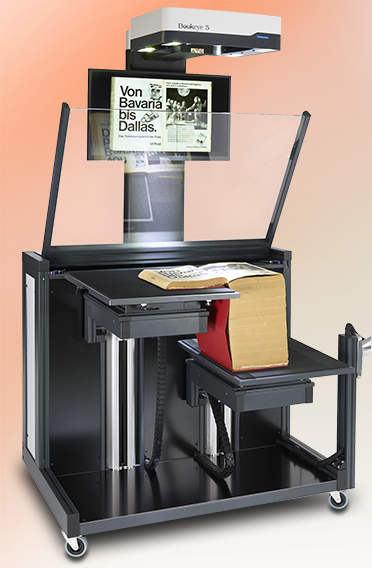
V-Cradle Book Scanner

Front View V-Mode Folder Mode Side View Back View
 

Bookeye 4 - Developed particularly with self-service applications in mind

With the latest member of the Bookeye family, Image Access placed an emphasis on developing a scanner which is compact, easy to operate and competitively priced; to bring high end professional scanning to an even larger population of users. The efficient Bookeye 4 digitizes source material such as bound documents at high speeds in up to 600 dpi optical resolution and formats up to DIN A2.

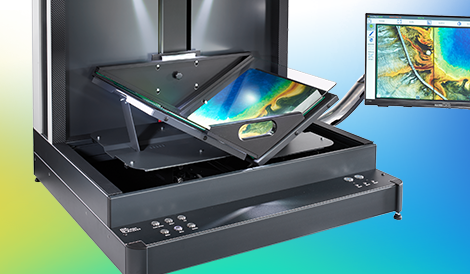
Over 17 years of electronic, optical and mechanical engineering experience went into the creation and manufacture of the Bookeye 4. The clever mirror mechanism captures the document precisely from edge to edge, whether it is a flat document or a book open at an angle of 120 degrees.

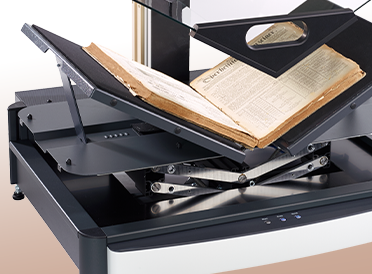
The V-shaped book cradle was optimized to reduce the risk of damage to book spines and binding during digitization. The book cradle holds the open book at an angle of 120 degrees; enough to effectively scan the contents of a page, while gently preserving the original subject matter.

Book scanning made easy

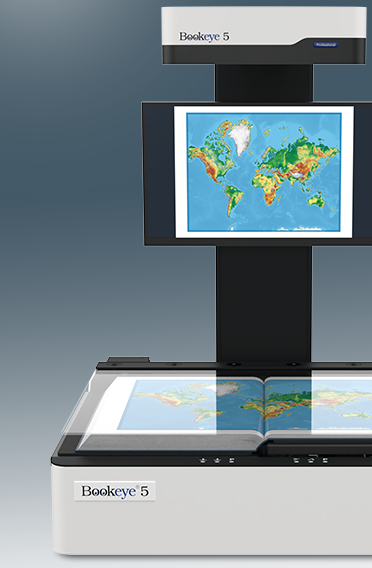
Bookeye 4 has all the advantages of a more expensive standalone device. Outfitted with an integrated color touchscreen and monitor, Bookeye 4 can reach unrivaled scanning speeds and process large volumes of data independent of any external peripheral devices – a typical feature of all Image Access scanners.

It takes approximately 2.5 seconds for the Bookeye 4 to capture the images of two pages of a DIN A3 sized book scanned at 200 dpi optical resolution. Once the image is on the screen, modifications can be made to scan parameters such as brightness, color or contrast without having to rescan. Users operate the system intuitively, guided by clear and well structured menu commands on the touchscreen. Scanned images can be saved to a USB flash drive, printed on a connected or network printer, uploaded to an FTP Server or even sent via eMail.

Bookeye 4’s solid functionality, innovative features and competitive pricing make it an ideal book copier for large groups of users; for example, in a university library. The advantage of a Bookeye 4 over a normal copier is the protective handling of the subject matter to be scanned and the immediate availability of the resulting images to a wider audience. Distribution of the scanned material can be virtually paper free – an ecological argument for Bookeye 4.

Imprint  |  Legal Terms  |  Terms of use  |  AGB  |  Contact 
white Deutsch   white English         usa  Image Access USA    DLSG    BE4Iconwww.scan2net.com BE4Iconwww.bookeye4.com
hr
 orangeDot Book Scanner BE4-V2  ScannersBE4-SGS-V2Functions Functions & Features  ScannersBE4-SGS-V2ProductBrochure Product Brochure  ScannersBE4-SGS-V2ProductPhotos Product Photos  ScannersBE4-SGS-V2Presentation Presentation  ScannersBE4-SGS-V2Documentation Documentation  ScannersBE4-SGS-V2TechDat Technical Data  ScannersBE4-SGS-V2Specification Specification  ScannersBE4-SGS-V2Conformity Conformity  ScannersBE4-SGS-V2PriceList Price List  ScannersBE4-SGS-V2FirmwareUpdates Firmware Updates Image Access Video

Follow us on the Web:

Twitter LinkedIn facebook Subscribe to me on YouTube Blog2Net

Newsletter registration


Unsubscribe from Newsletter
 ScannersWT25-600 Flatbed 25*18,5" (A2)  ScannersWT25-200 Flatbed 25" (DIN A2)  ScannersWT36-200 Wide Format 36"  ScannersWT36DS-200 Wide Format 36" DS  ScannersWT36C-300 Wide Format 36" C  ScannersWT36MFS-200 Wide Format 36" MFS  ScannersWT42-200 Wide Format 42"  ScannersWT48-200 Wide Format 48" orangeDot Book Scanner BE4-V2  ScannersBE3-SGS-R2 Book Scanner BE3-R2  ScannersBE3-SGS-R1 Book Scanner BE3-R1  ScannersScanRobot ScanRobot  ScannersPlanScan PlanScan  ScannersThirdPartyProducts Third Party Products
 http:www.scan2net.de Scan2Net® Technology  SoftwareScan2iPF Scan2iPF  SoftwareScan2ICC Scan2ICC  SoftwareScan2USB Scan2USB  SoftwareScan2VGA Scan2VGA  SoftwareScan2EDIT Scan2EDIT  SoftwareScan2PDF Scan2PDF  SoftwareScan2Pad Scan2Pad  SoftwareBatchScanWizard Batch Scan Wizard  SoftwareBookFoldCorrection Book Fold Correction
 DistributorsFind Find Distributors  DistributorsOnlinePurchase Online Purchase  DistributorsContact Contact
 SupportPortal Service Portal  SupportProductivityCalculator Productivity Calculator  SupportVPAT Accessibility VPAT  SupportContact Contact  SupportLinks Links  SupportDownloads Product Photos & Logos  SupportGlossary Glossary
 WhitePapersScanningSpeed Scanning Speed  New!  WhitePapersCCDOrCIS CCD or CIS  WhitePapersThePixelRace The Pixel Race  WhitePapersNoLightNoScan No Light no Scan  WhitePapersCompressionAndLosses Compression  WhitePapersTheResolutionMyth The Resolution Myth  WhitePapersScan2NetDifference Scan2Net Difference  WhitePapersTheTruthAboutTurbo The Truth about Turbo  WhitePapersBitsDensityAndNoise Bits Density and Noise  WhitePapersConnectivity Connectivity
 NewsEvents Events  NewsNewsletter Newsletter
 PressPressReleases Press Releases  PressInterviews Interviews  PressApplicationReports Application Reports
 ImageAccessImageAccess About Image Access  ImageAccessImageVideo Factory Tour  ImageAccessHistory Company History  ImageAccessTeam Team  ImageAccessLocation Factory Location  ImageAccessDirections Directions  ImageAccessContacts Contacts  ImageAccessPartners Partners
Image Access Productivity Calculator
Image Access Productivity Calculator

WideTEK 25 Flatbed Scanner
WideTEK 25 Flatbed Scanner

Bookeye® 4-V2 Book Scanner
Bookeye® 4-V2 Book Scanner

WideTEK 36C CIS Wide Format Scanner
WideTEK 36C CIS Wide Format Scanner

WideTEK 36 Wide Format Scanner
WideTEK 36 Wide Format Scanner

WideTEK 36DS Wide Format Scanner
WideTEK 36DS Wide Format Scanner

Bookeye® 3-R2 Book Scanner
Bookeye® 3-R2 Book Scanner

Bookeye® 3-R1 Book Scanner
Bookeye® 3-R1 Book Scanner

WideTEK 42 Wide Format Scanner
WideTEK 42 Wide Format Scanner

WideTEK 48 Wide Format Scanner
WideTEK 48 Wide Format Scanner

WideTEK 36MFS Wide Format Scanner
WideTEK 36MFS Wide Format Scanner